 Many good freeware programs come bundled with the OpenCandy installer. This article provides information on OpenCandy and shows how to avoid it.
What Is OpenCandy?
I will try to be as diplomatic as possible here. In a nutshell OpenCandy is a way for freeware developers to make a dollar or two by offering to install 3rd party software. At times the wording of such offers has been convoluted at best. Some anti-virus vendors including Microsoft (as recently as August 13, 2013) have flagged OpenCandy bundled software has malware (source) :
Adware:Win32/OpenCandy is an adware program that might be bundled with other installers. Some versions of this program send information specific to your computer (like a unique machine code, operating system information, and location) to a remote server without getting enough consent from you. These versions are detected by Microsoft’s security software.
Which Software Comes Bundled With OpenCandy?
Unfortunately there seems to be no master list. Older versions of the OpenCandy Wikipedia article had a list but it may have been wrong. It seems it was deleted by someone with an agenda because removing this list is the only thing that individual ever did on Wiki. OpenCandy itself had a list but it has been removed (you can see it on the Internet Wayback Machine http://web.archive.org/web/20120915071836/http://www.opencandy.com/kick-apps/).
A Cnet article on the subject states:
A broad range of developers and advertisers have partnered with OpenCandy. On the advertiser side, there are big name players like Microsoft, Amazon.com, Symantec, and AVG, but also smaller outfits like TuneUp. Better-known developers that use OpenCandy include AOL Instant Messenger, WinAmp, and the gamer favorite CheatEngine.
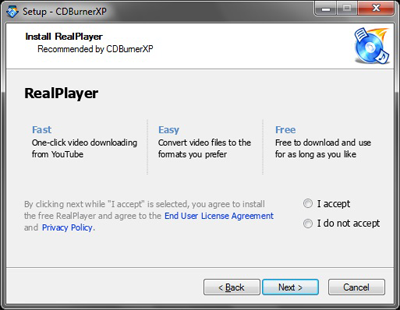
Aside from the companies listed above, I’ve personally seen it with CDBurnerXP, IZarc, and System Ninja to name a few.
It may look like this:
My Thoughts On OpenCandy
I’ll quote the character Vito Corleone (The Godfather):
It makes no difference, it don’t make any difference to me what a man does for a living, you understand. But your business is a little dangerous…I want to congratulate you on your new business and I’m sure you’ll do very well and good luck to you. Especially since your interests don’t conflict with mine. Thank you.
How To Avoid The OpenCandy Installer
OpenCandy provides the answer in their FAQ’s:
How do I avoid OpenCandy offers?
Simply decline any OpenCandy recommendation(s), and OpenCandy will disable and delete itself when the main installer you are running completes. If any offer does install without your consent, this is likely from some other 3rd party and is not an OpenCandy offer. It is a violation of our network Policies. Please notify us of the app you were installing and the offer which was installed and we will take steps to remedy the situation or terminate relations with that software developer.
For those of you still unconvinced, try any of these steps:
– Beginner: disconnect your internet connection (beware some software needs the internet to complete its install)
– Intermediate: run the OpenCandy powered installer from the command-line with /NOCANDY
– Advanced: add a domain block in your firewall for *.opencandy.com
By Example
I do it via command line. Open the folder that contains the downloaded file > type in the file name then add a space and /nocandy:
G:\>cdbxp_setup_4.5.2.4214.exe /nocandy

See:
Command Prompt: frequently asked questions
Windows 8 – Elevated Command Prompt
Ultimate Windows Tweaker (to add Admin Cmd Prompt to right-click menu)
-END-